Brought to you by Dimitris, founder and Chief Grease Monkey of World Anvil.
Discover the latest development updates, improvements and fixes. Have a question or feedback? Join our Discord server and visit #development-feedback.
Update
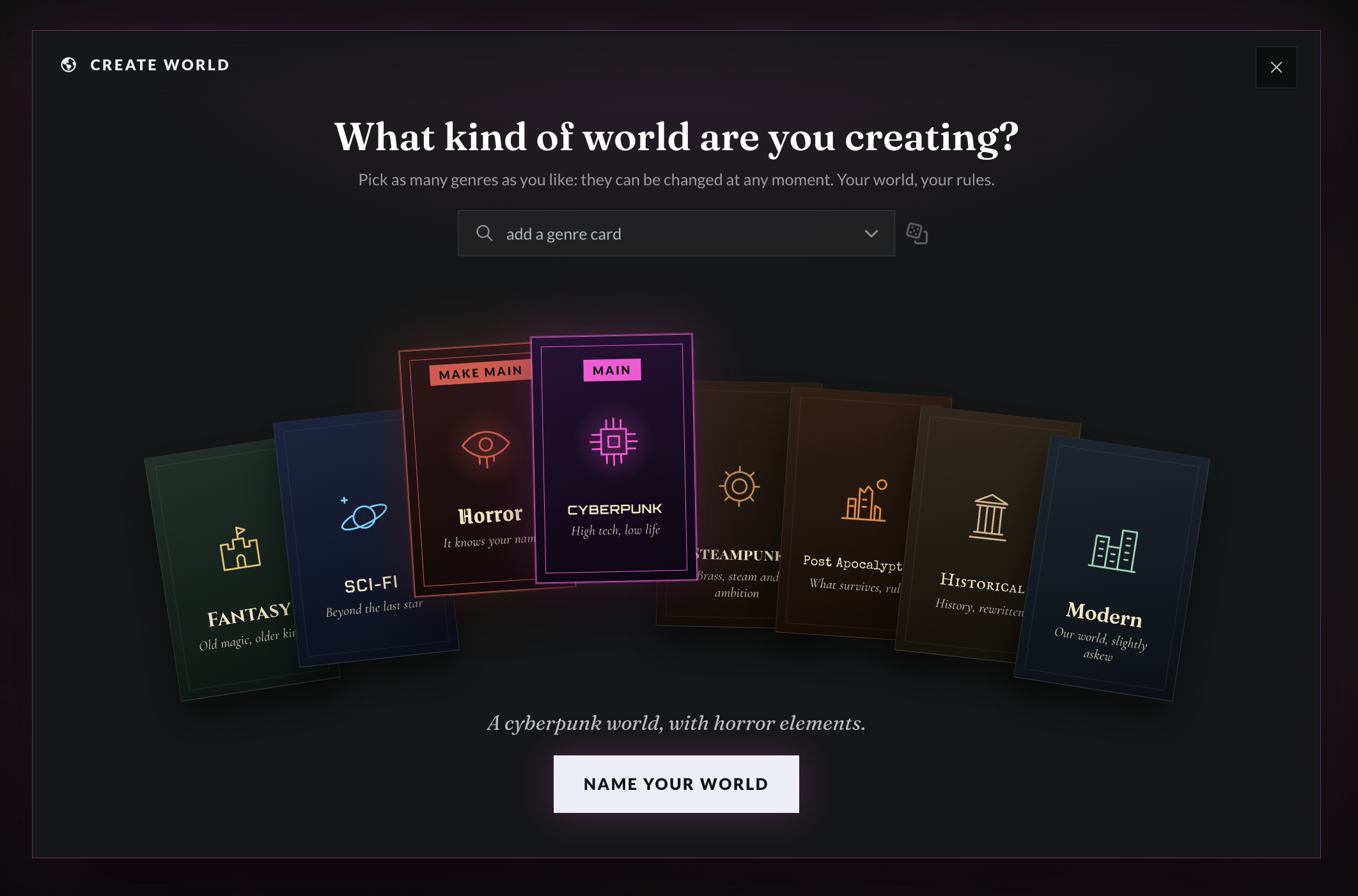
New World Creation Process
New worlds require inspiration... We aim to excite you to create your new world!
The new world creation process aims to make the creation of a new world more fun and inspiring to give you the boost you need to launch your project and have the most fun you can with it.
Update
Manuscripts 1.5.6
After popular demand, we added the ability to move a chapter to another world, also for those with large manuscripts, I have updated the navigation and added search to make it easier and nicer to look at!
Ability to move manuscripts across worlds (automatically also switches your world to the selected world)
Search for Manuscript Chapters on Presentation
Better navigation for manuscripts with long list of Chapters both on Desktop and Mobile
New Feature
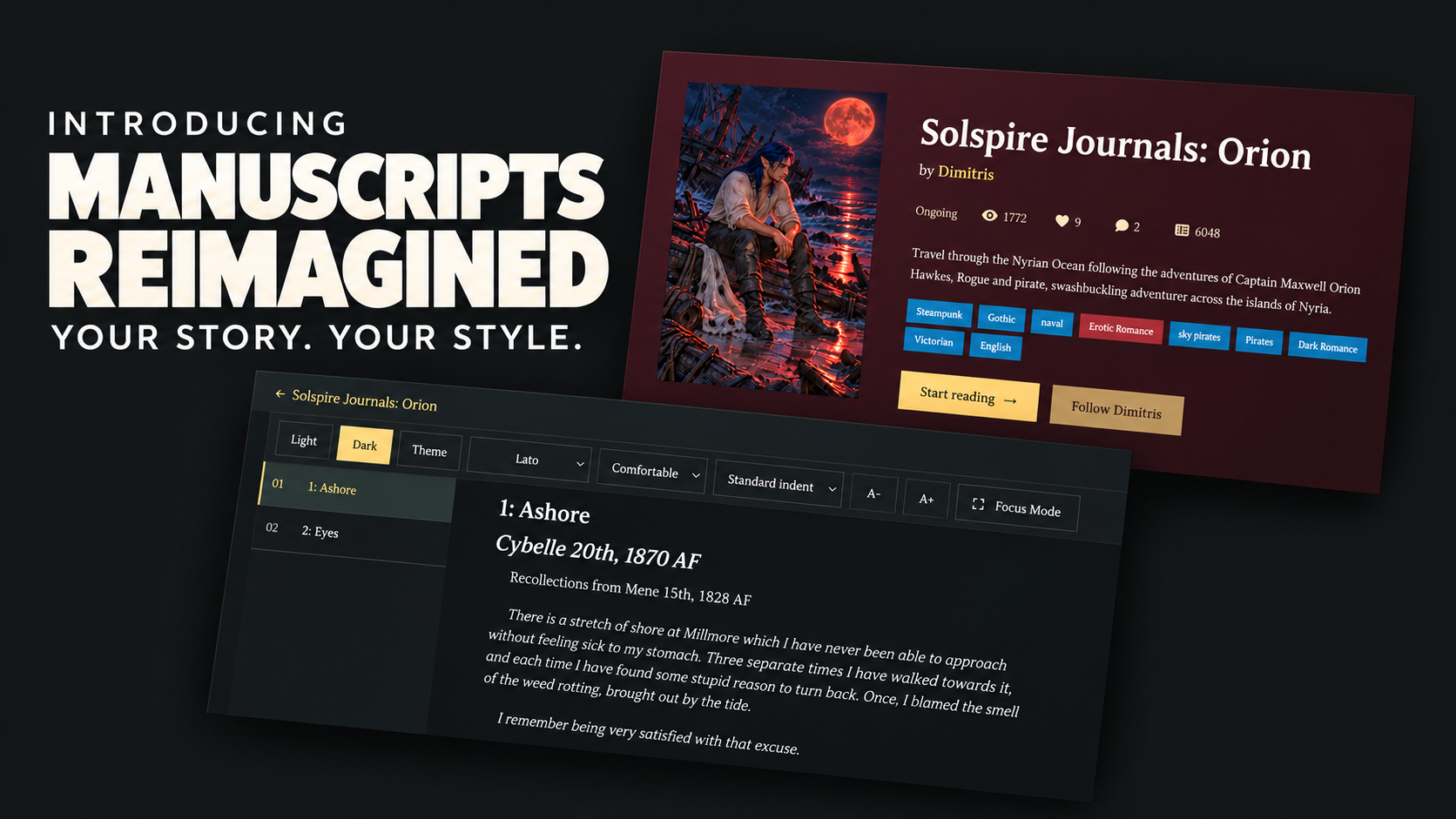
Manuscripts Reimagined: Your Story. Your Style.
Give your stories a new home with redesigned manuscript pages, six visual themes, and a reading experience your readers can make their own. Discover improved mobile navigation, focus mode, and more control over your published work.
Your stories deserve a presentation that draws readers in—and a reading experience that keeps them turning the page.
We’ve refreshed World Anvil’s manuscript presentation and chapter pages, bringing them into the same design family as our new user profiles.
A new home for your stories
The redesigned manuscript page puts your cover, title and synopsis centre stage, with clear chapter navigation and a prominent invitation to start reading. Author information, social links and a dedicated world card help readers discover the creator and setting behind the story.
Visitors get the same consistent presentation whether they’re signed in or browsing as guests.
Six themes, now for manuscripts
Give each manuscript its own atmosphere with Blackwake, Solspire, Mourning Bell, Astraea, Meridian Helix, and Oath & Ember.
Open the Manuscript Styling panel to preview a theme on your story. Guild members can save their choice for visitors to enjoy. Each manuscript has its own selection, independent of your profile and other books.
Read your way
The new chapter reader brings more control to every reading session:
Choose Light, Dark, or Theme to read using the manuscript’s colours.
Adjust the typeface, text size, line spacing and paragraph indentation—including turning indentation off.
Enter Focus Mode for a distraction-free reading space.
Keep your reading preferences between visits.
Built for reading on mobile
Enjoy full-width navigation, a chapter browser that opens across the screen, and a header that moves out of the way as you read and returns when you scroll upwards. Moving through a story should feel comfortable on a phone as well as a desktop.
Stay connected to the story
Like a chapter, leave a bookmark, follow its author, or share it through the platform buttons and copy-link option.
Need to sign in first? You’ll return to the manuscript or chapter you were viewing after login. This also works when signing in from a public world page.
More control for authors
Chapter publication and announcements are now separate. Publishing no longer automatically sends an announcement: choose when to notify your account followers, add a personal message, and select the chapters you want to share.
You can also disable manuscript comments from Manuscript Settings → Access. Clearer publication notices and visibility controls make it easier to see what’s ready for readers.
Open your manuscript’s public page, try a theme, and give your next chapter a new setting.
New Feature
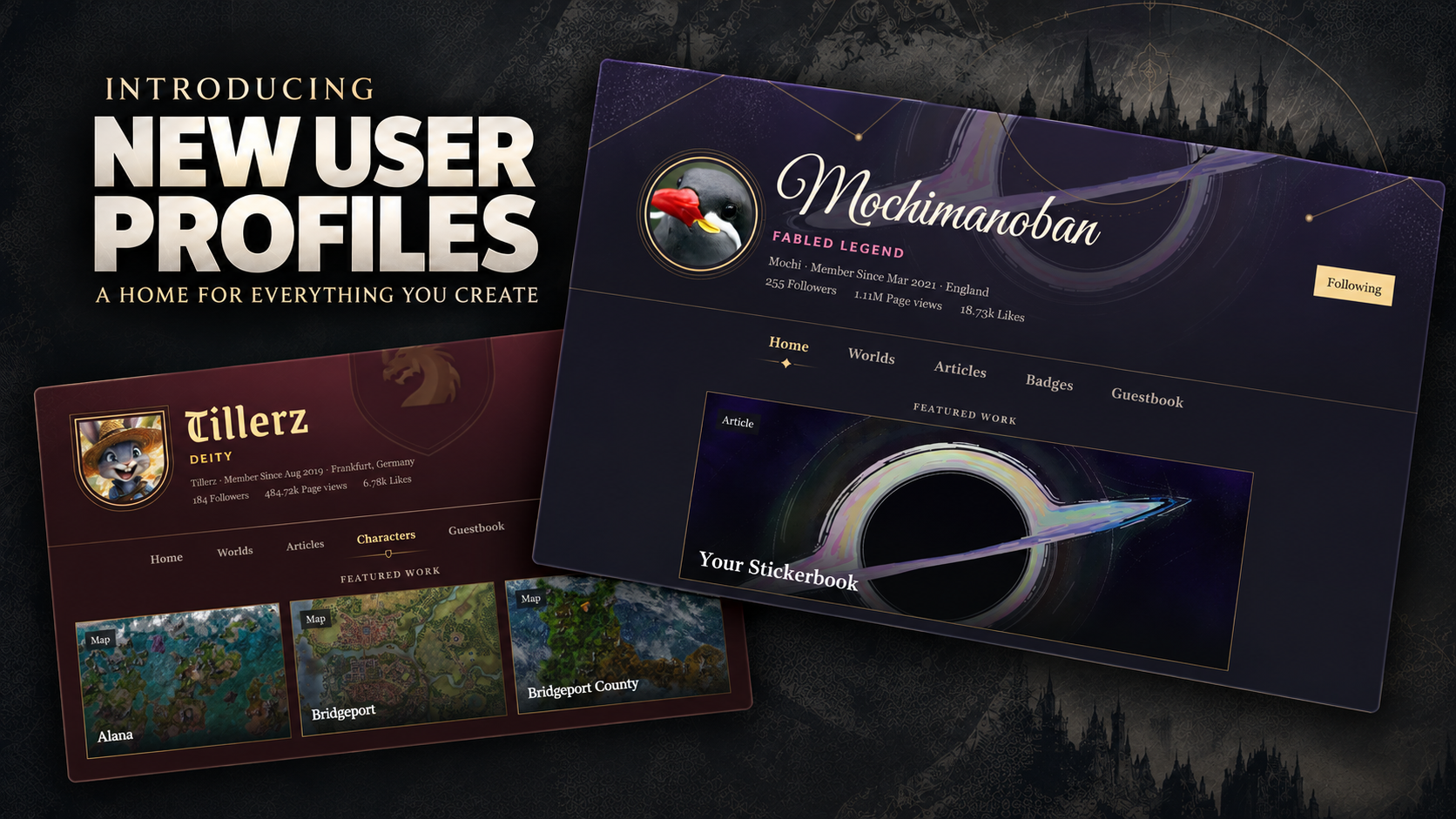
Title Your New User Profile: A Home for Everything You Create
Your World Anvil profile has a new look and new ways to share your creations! Post journal entries, connect with readers, and showcase your work. Guild members can also choose a theme, feature their favourite creations, and control which tabs visitors see.
A fresh look for your creative home
Your portrait, cover image, and Guild rank take centre stage in a redesigned header. Profiles without a custom cover now receive an illustrated default, and the updated editor makes it easier to manage your introduction, links, interests, portrait, and cover.
The Home tab brings your introduction and latest posts together, while dedicated tabs help visitors explore your worlds, articles, characters, manuscripts, badges, and guestbook.
Share what you’ve been creating
You can publish journal posts directly from your profile. Open the composer, write your entry, and choose your audience:
Your profile: share with visitors to your profile without spending coins.
The wider community: publish to the global feed for the usual coin cost.
Give your post a visual introduction with either a cover image or an article header. The redesigned feed and conversation panels make it easier to read posts, leave comments, reply, like, and copy a link to share elsewhere.
Put your favourite work in the spotlight
Guild members can choose up to three featured creations to appear directly below their profile navigation.
Feature a world, article, map, character, or manuscript—or mix them together. Each card identifies its content type, and you can replace or remove your selections whenever you like. When all featured items are characters or manuscripts, visitors see a portrait-style presentation.
Make your profile your own
Guild members can apply profile themes and choose which tabs visitors see. Keep a tab checked to display it, or uncheck it to hide it from your profile navigation.
Freemen can preview themes, but applying a theme, displaying featured work, and hiding tabs require an active Guild membership. Previously saved customization settings won’t apply while an account is a Freeman.
Hiding a tab changes your profile’s navigation; it does not make the underlying public content private.
A shorter address to share
Your profile now lives at worldanvil.com/~USERNAME. Existing /author/USERNAME links redirect to the new address, so your older links still work.
Visit your profile, open Edit profile, and make yourself at home.
New Theme
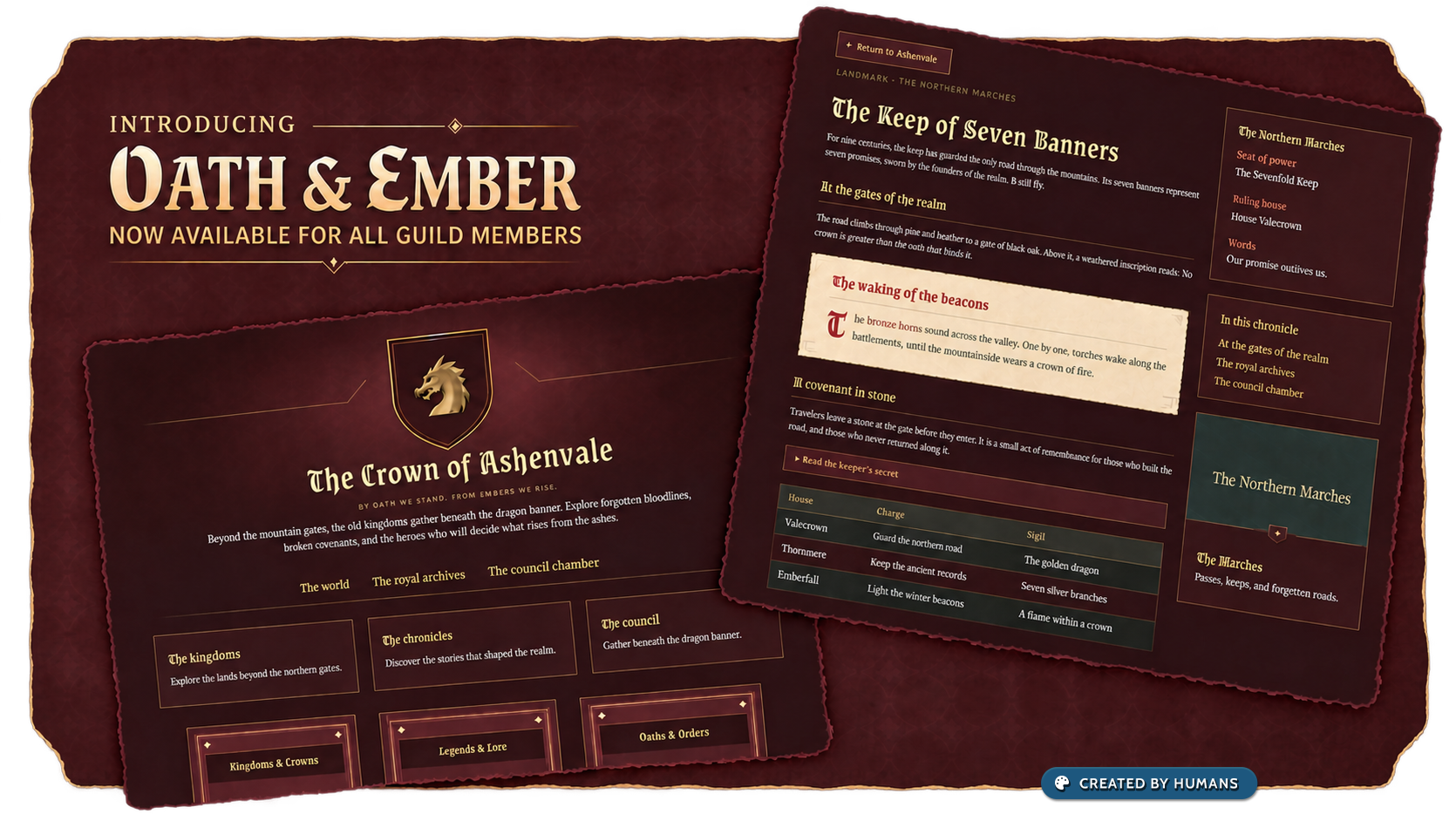
Introducing Oath & Ember
Introducing Oath & Ember, a new epic fantasy theme for all Guild members! Bring your world to life with rich burgundy, gilded details, Gothic headings, frayed vellum passages, and dark blue velvet secrets.
Every kingdom has its chronicles. Every dynasty has its secrets. Give yours a fitting home with Oath & Ember, our new epic fantasy theme, now available to all Guild members.
Rich burgundy backgrounds, golden borders, and a dragon-crested cover set the stage for royal courts, ancient rivalries, and adventures worth remembering. Gothic headings bring the character of an illuminated manuscript, while warm ivory text keeps your stories comfortable to read.
From the archivist’s folio
Read-aloud passages and quotations appear on gently textured vellum with frayed edges, bringing your narration, prophecies, and memorable words onto the page. Secrets take on a different mood: dark blue velvet, silver-blue headings, and pale gold links give hidden knowledge its own distinctive presentation.
A theme for your whole world
Oath & Ember carries its styling across articles, maps, books, discussion boards, and family trees. Coral labels distinguish key details from their values, while coordinated navigation and article previews help readers explore your world.
Whether you’re chronicling the fall of an empire or preparing your party’s first audience with the crown, Oath & Ember is ready for your next chapter.
Choose Oath & Ember in your world’s styling settings to get started.
New Theme
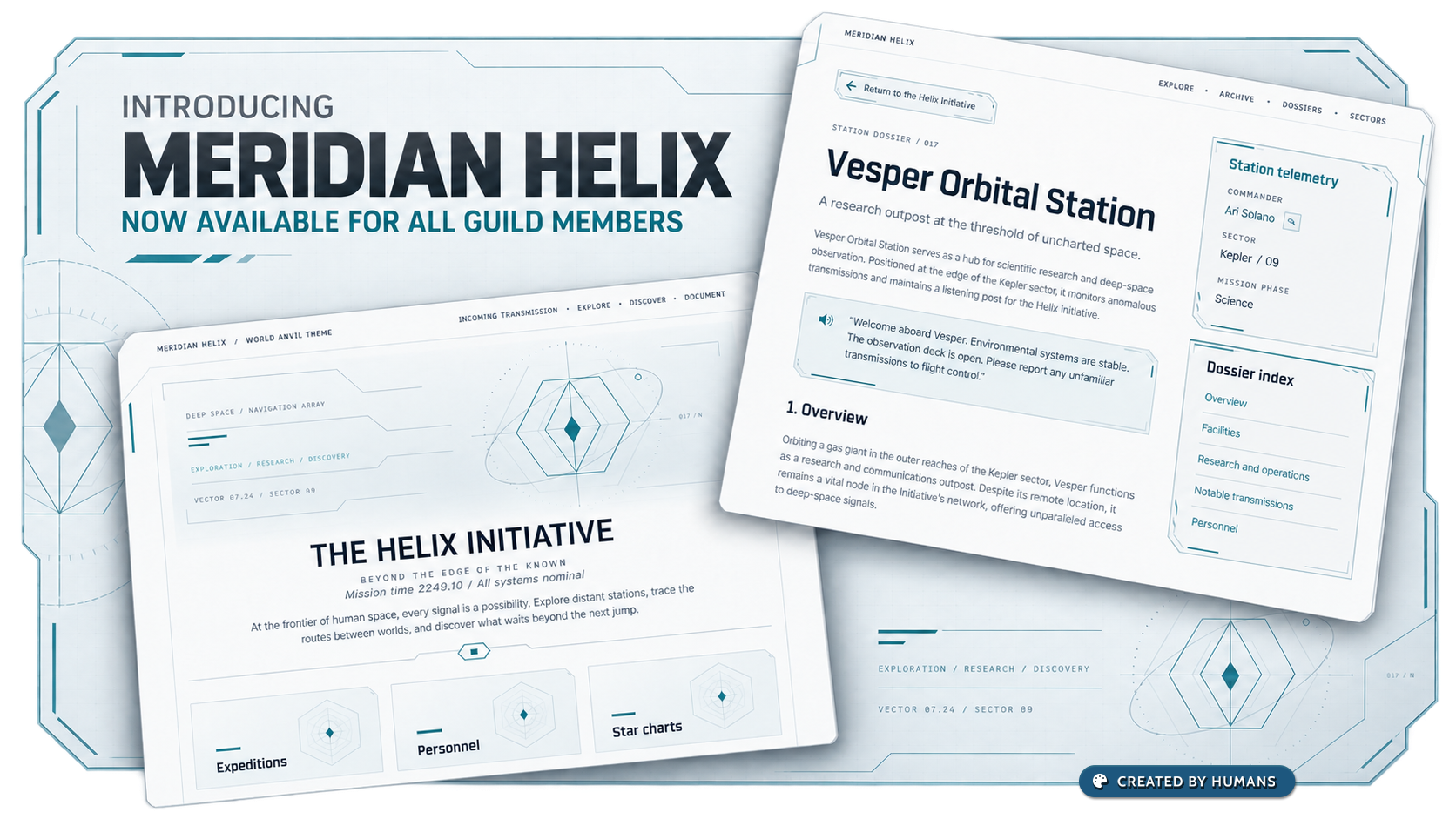
Introducing Meridian Helix
Give your world a sleek science-fiction interface with Meridian Helix. Light surfaces, cyan accents, angled borders, and crisp technical typography bring clarity and character to everything from starship dossiers to planetary archives. Available to all Guild members.
Your next frontier deserves a new interface. Meet Meridian Helix, our new light science-fiction theme.
Clean, pale surfaces, subtle background texture, and cyan accents combine with angled panel borders and crisp technical headings. Articles become dossiers, books become data modules, and your world takes on the feel of an exploration archive.
From orbital stations and research outposts to distant colonies and interstellar civilizations, Meridian Helix keeps your worldbuilding readable while giving it a distinctly futuristic identity.
Available now to all Guild members. Open your world's styling settings and choose Meridian to try it.
New Theme
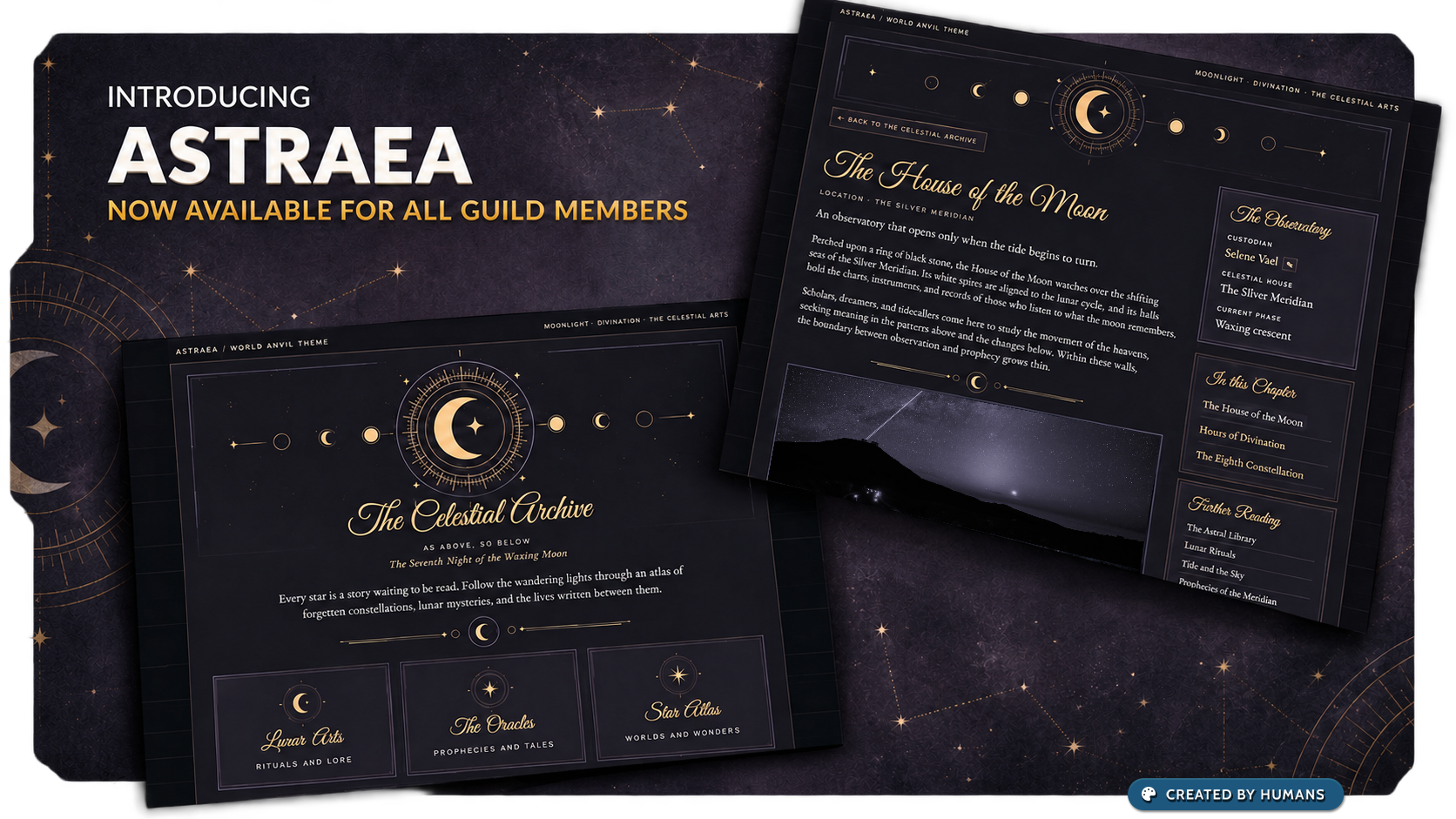
Introducing Astrea
Bring celestial elegance to your world with Astraea, a new theme inspired by astrology and lunar magic. Deep charcoal, mauve accents, golden ornamentation, and flowing script headings create a home for mystical worlds. Available to all Guild members.
A little moonlight for your worldbuilding. Astraea is our new celestial theme, inspired by astrology, lunar magic, and the mysteries of the night sky.
Deep charcoal backgrounds meet soft mauve details and warm gold accents. Flowing script headings, moon-phase ornamentation, and delicate borders bring a distinctive atmosphere to your articles, maps, and books.
Whether you are documenting an ancient prophecy, a secret magical society, or an entire constellation of worlds, Astraea gives your lore a place among the stars.
Available now to all Guild members. Open your world's styling settings and choose Astraea to try it.
Update
Manuscripts 1.5.5
The notification system for Manuscripts has been redesigned:
Notifications are no longer sent automatically when you publish a Manuscript.
You now have the option to send a custom notification message whenever you want and add links to specific chapters in the notification.
Notifications are sent to both your account followers and your world followers.
Update
Manuscripts 1.5
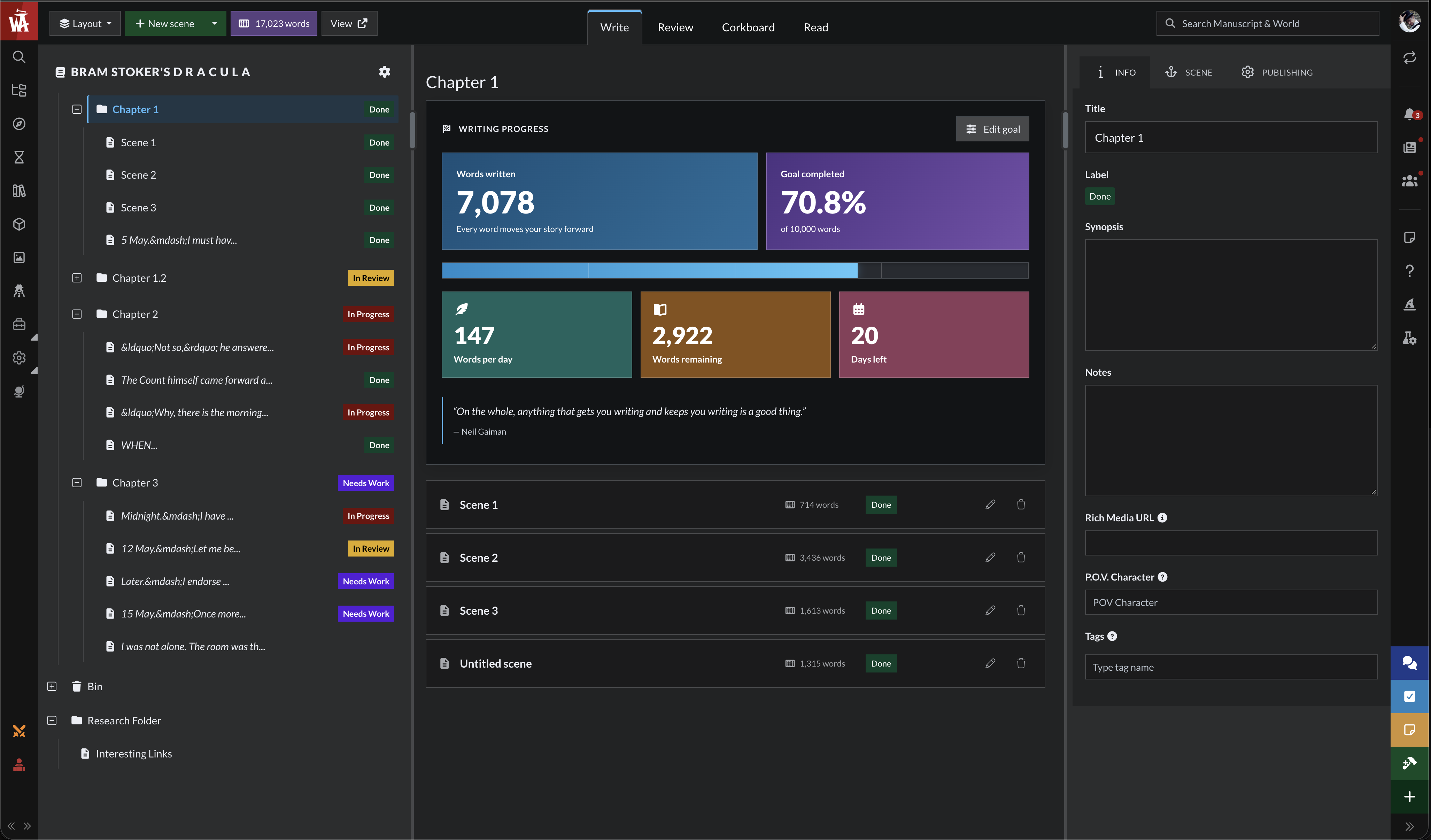
Manuscripts got a fresh coat of paint! The 1.5 version brings:
A refreshed interface
Set goals for words per manuscript or chapter with a deadline
New corkboard mode: Organize your chapters and scenes with drag-and-drop
The review mode has been redesigned to be easier to use and more responsive
The read mode has also been redesigned with new reading settings
Manuscripts supports both light and dark modes
You can now create your own labels
Easier access to options to create scenes or chapters, change the UI layout, and configure the writing environment.
Update
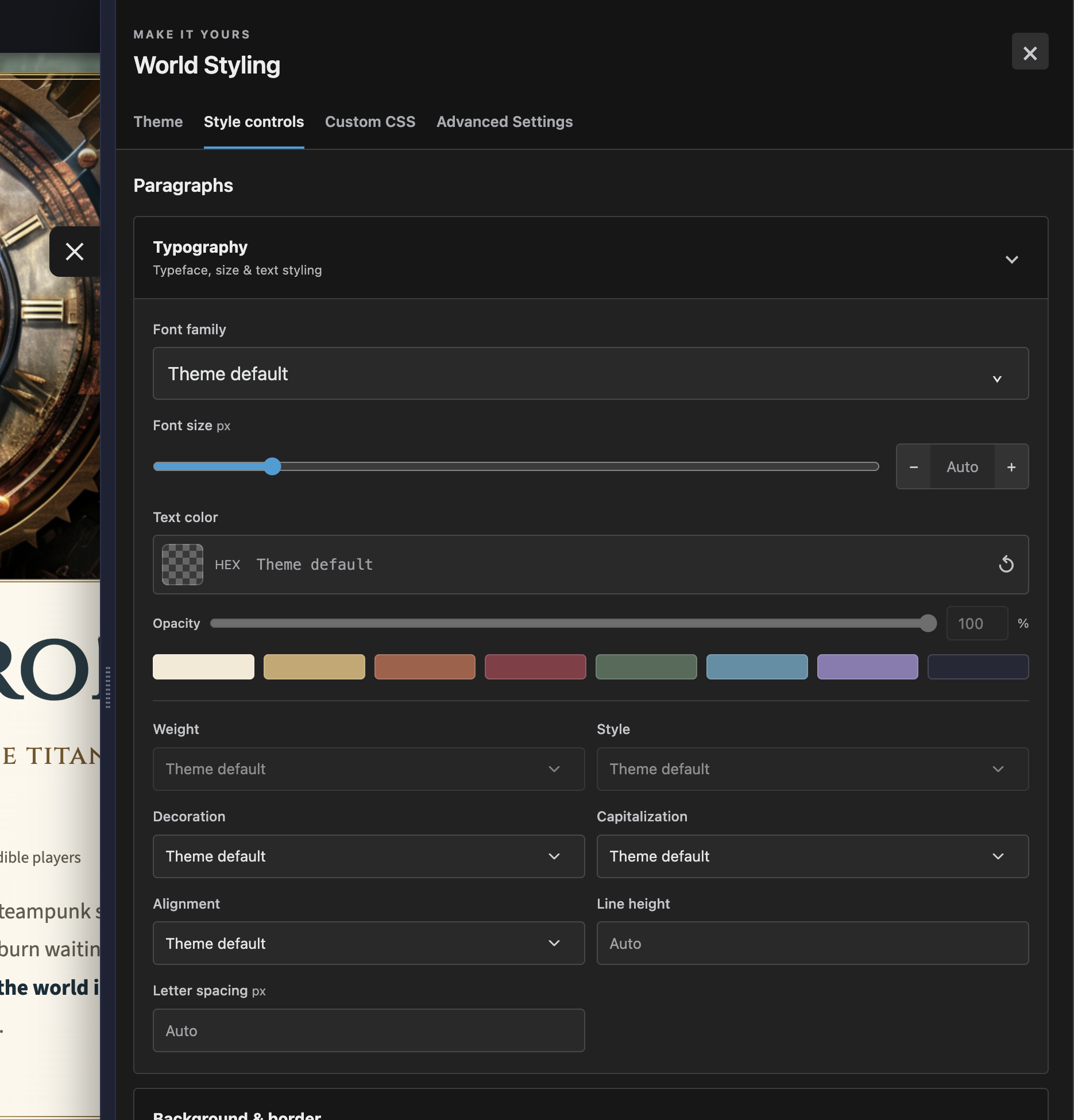
New World Styling Menu
With the new World Styling Menu, you can edit the visual theme of your world without using CSS! Give your world a new coat of pain with the new styling tools, use CSS code if you prefer, or simply select one of the pre-made themes. Check out the styling guide for details.
New theme
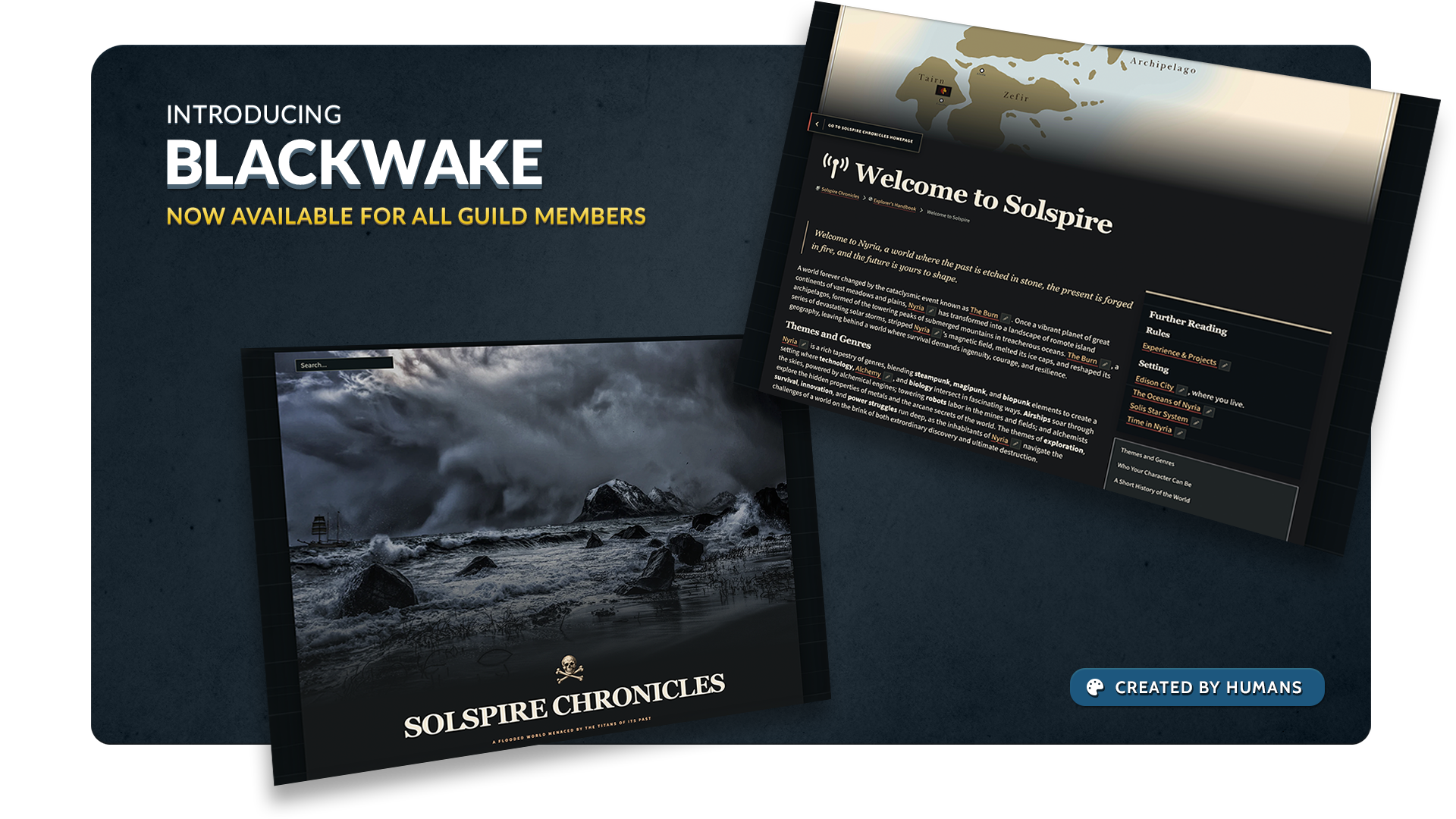
Introducing Blackwake
Give your world a darker horizon.
For all Guild members
Stormy seas, deep blue textures and crisp, light text give Blackwake a dramatic maritime atmosphere. It’s a new look for worlds of dangerous voyages, hidden shores and stories told after dark.
Blackwake is now available to all Guild members.
New theme
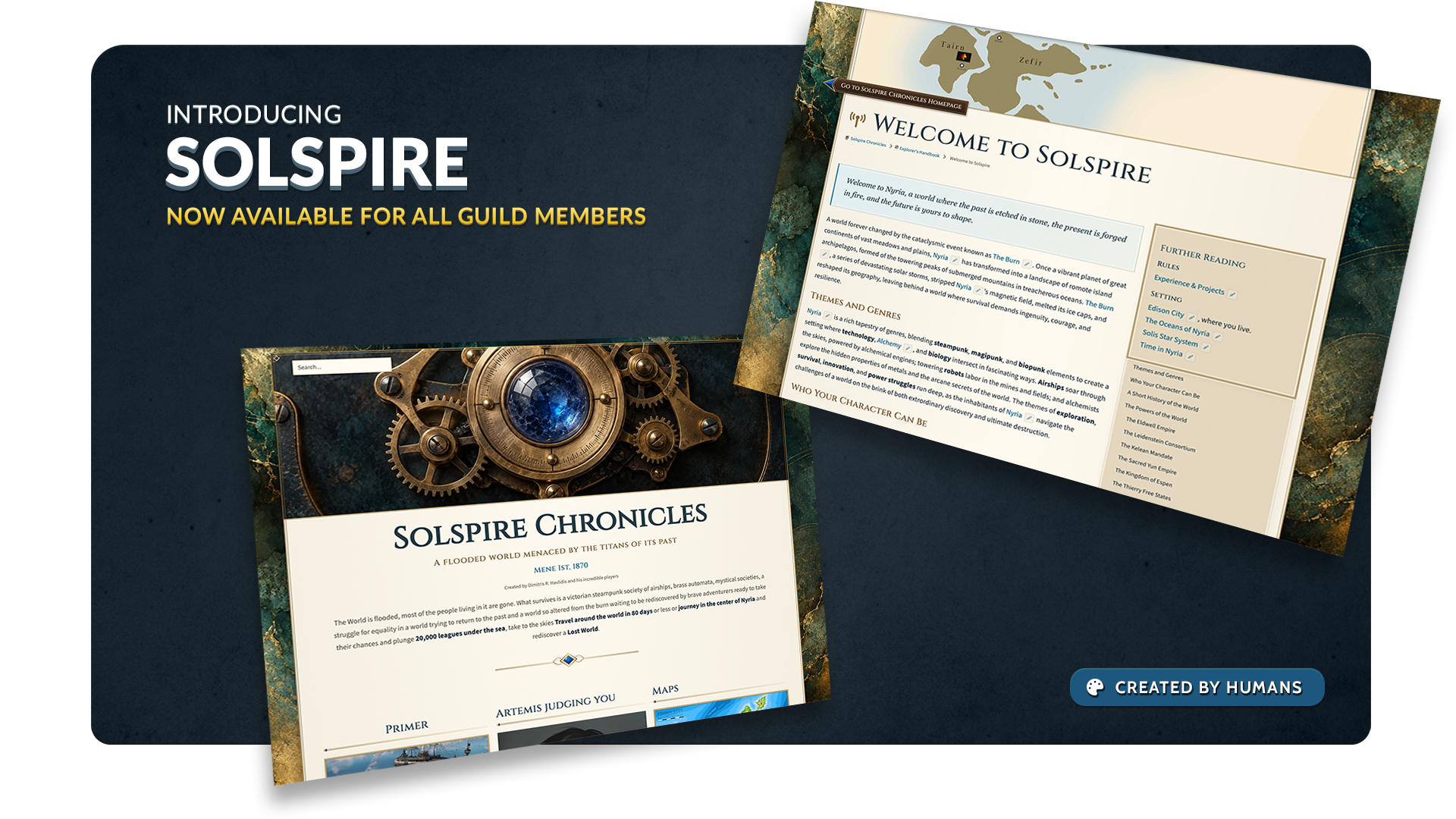
Introducing Solspire
Let your world shine on the page.
For all Guild members
Warm parchment, elegant typography and decorative detail give Solspire the feel of a treasured chronicle. Bring a lighter look to your world’s stories, places and discoveries.
Solspire is now available to all Guild members.
New theme
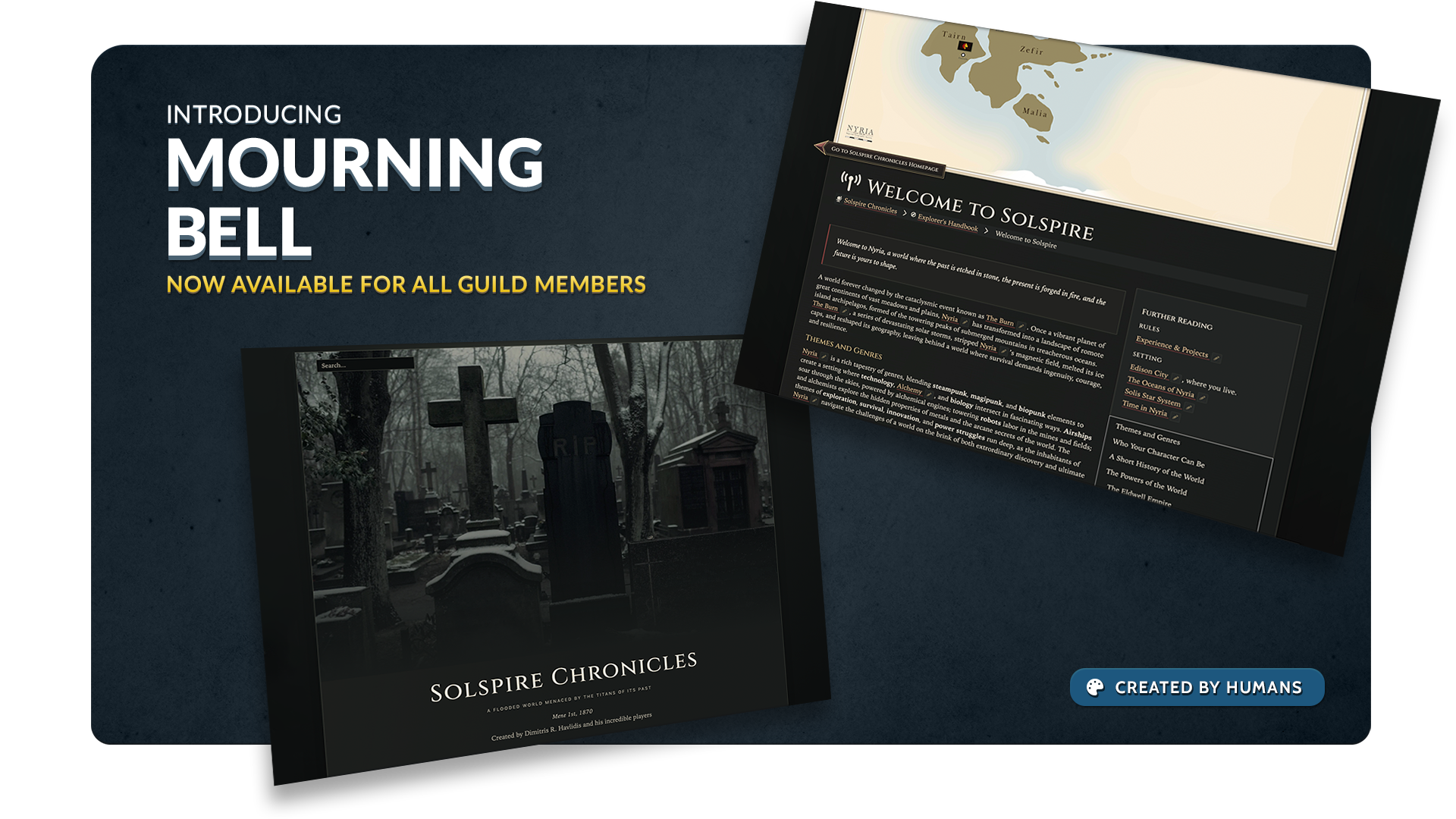
Introducing Mourning Bell
Set the scene for darker stories.
For all Guild members
Muted tones, dark pages and pale lettering give Mourning Bell a quiet, gothic atmosphere. Set the mood for haunted places, unsettling mysteries and histories that refuse to stay buried.
Mourning Bell is now available to all Guild members.
Update
New Belligerents editor
The Belligerents feature has been moved to the new article editor. Create or edit a Military Conflict article and click the new Belligerents button at the bottom. Check the Learn page for more information.
Update
Referenced In panel
See which articles have links to the current article in the new UI! Go to article preferences and click "Referenced In" to get started.
[UPDATE] Manuscript wordcount
You can now set a word count for your Manuscripts to better track your progress and goals
[UPDATE] Character profile link
When editing a Character article, you'll now see a View Character Profile button if that article is connected to an RPG character profile.
Update
Cleaner article edit
In edit mode, the following article fields have been moved to the Styling menu: subheading, credits, pronunciation, excerpt, and mouseover snippet.
[CONTENT] Nimble
The Nimble RPG character sheet template has been added to our collection. Thanks to Tillerz for implementing it!
Update
Default privacy
When creating in a private world using the new UI, articles, categories, timelines, and events will all be created as private.
[UPDATE] Design tweaks for community posts
We've applied a minor design refresh to community posts.
Update
Dictionaries
We've ported the Dictionary feature to the new editing interface. To get started, edit a Language article and click the Dictionary option in the bottom toolbar.
Update
Map Markers in global search
Map markers will now appear in the world search results. Click the magnifying glass in the left sidebar, or press Ctrl+K on your keyboard, to launch the search.
Update
Professional Article Settings
The professional settings for articles, such as the SEO fields, have been ported over to the new interface. We'll continue to port over the remaining options from the old article edit interface to the new UI soon.
Update
Family Trees
Create and manage Family Trees from the new article edit interface!
Click on the name of any character in the family tree preview to access their own relationships management.
Streamlined relationship creator by adding the ability to directly link or create Spouses and Children.
Manage Extended Relationships (i.e. friends, enemies, etc) from the same window.
New feature
Live updates system
This update to World Anvil opens the doors to performing live updates on your interface! In this first release, we've implemented these features:
Editing indicator: See who is editing which article in your world. If your article is already being edited, the system will block you from editing to prevent overwriting and data loss.
Live community updates: The Discovery stream now updates live. Additionally, users can only add one article to the Discovery stream every 24 hours, to ensure a more diverse showcase!
Live Continue Working updates: The Continue Working widget in the world dashboard will also update live as you or your authors work on your world.
Trickledown
To-do lists and image mass edit for everyone
To-do list: organize and manage your tasks to stay productive. Check the guide.
Image mass edit: Edit multiple images at once. Learn how.
Feature
New Diplomacy Management
Diplomacy Webs have moved to the new article edit interface.
Create relationships between factions, countries, and corporations from the new Diplomacy button in the article edit toolbar.
[FEATURE] Automatic article sorting in categories
New option available in the "Article Management" tab of your categories: click "Order by" to see it.
You have multiple sorting options, including alphabetical and update date. The sorting order will apply to new articles added to the category too.
The article sorting will apply to both edit and view mode.
Update
CSS live editor improvements
The editor now supports syntax highlighting, autocomplete, and error checking.
Drag the editor left border to make it wider or narrower.
Click the full-screen button to make it to full-screen.
Click the broom button to automatically clean up your CSS formatting.
Update
A cleaner interface and smoother article editing
The top menu bar has been moved to the right. It has the same options as always, but they're now available everywhere without UI overlaps. You can also collapse the sidebar to hide it.
On mobile, it loads hidden to maximize screen space. Click the arrows at the top right corner to reveal it.
[UPDATE] Collapse article side panels
In edit mode, you can now collapse the side panels on the right to get more space for your writing.
[UPDATE] Better copy-paste on your articles
The copy-pasting behavior has been improved, so pasting complex content like tables should now be more reliable.
[UPDATE] New Help Center
The Help Center modal on the right sidebar has been updated for easieraccess to all the help resources.
[BUGFIXES]
Fix for generic articles not registering parent category on create
Fixed scrolling issues for large screens for news and community modals
Fix for articles being transferred to another world did not reset their parent category or article
Fixed the Table of content categories and articles not being ordered in the same way between the editing interface and the world view
Better error handing for categories not being created in the Articles & World Manager
Fix for some article creation forms not able to save data when manual save is activated
Fix to successfully delete comment in your own Manuscript
Content
Default Background Images
We have added more pastel and vibrant background images for you to choose from as your cover images for articles, timelines, and more.
A new "Muted" folder in the Default Background tab has been added for better organization.
Update
Portraits for more templates
Portrait images are now available for the following templates (in addition to Character and Organization): Item, Material, Title, Vehicle, Species, Geography, Settlement, Landmark, Ethnicity.
[UPDATE] Expanded BBCode support for timelines
The Timeline text editor now supports more BBCode options, which expands the formatting options available to you.
[UPDATE] New design for secret blocks
When you embed a secret with the Visual Editor, the preview block now displays whether the secret is revealed or not.
[MINOR] Minor updates
FontAwesome has been bumped up to version 7.2.0, which adds thousands of new icons.
The world switcher has been added back to the Article Manager (top left by the name of the world.
[BUGFIXES]
You can no longer toggle a no-empty prompt field. This prevents content loss in articles.
Deleting all subscriber groups of a campaign no longer deletes the campaign itself.
World transfers are working again.
The "hide sidebar" option now properly collapses the sidebar in Articles & World Manager.
Fixed an error that prevented the Plots page in the Campaign Manager from loading.
Fix for forced double click on articles on certain trackpads.
Fix for quick article creation in visual editor's mention menu; keyboard navigation now correctly creates articles.
Update
World dashboard upgrades
The new dashboard configuration screen (accessible from the gear icon in the bottom left) lets you choose which widgets you want to see and where.
5 new widgets you can choose.
Quickly change the background of the dashboard.
[UPDATE] Timelines update
Minor upgrades to the design of timelines for better consistency with the rest of the site.
Small tweaks to historical event management to make it faster.
[UPDATE] Other minor updates
The view mode within the Article Manager now has better rendering of content blocks.
Guild member co-owners of a world now have access to Manuscripts of the world they're co-owners of.
[FIX] Several bugfixes, including:
Icons not displaying in world homepage.
RPG sessions not appearing in the Session Report template drop-down.
Line breaks breaking key-value fields in the Visual Editor.
An error that happened when editing historical entries.
Update
Advanced Article Management
In the Article Manager interface, you will now see an "Article Management" tab when editing a category. Use this tab to create articles on the fly, make quick edits to articles, and checking article metadata.
Browse everything from the search panel without opening the sidebar (so you can access and check your articles, categories, maps, etc. without closing the article you're working on).
Results are now sorted by entity type.
By default, it shows all the latest content you've worked on your world.
[UPDATE] Articles & World Manager
Better drag and drop: You can now drag and drop articles from the tree on the left into a category opened on the right.
New color scheme and design for the slanted menu (i.e. the toolbar at the bottom of the editor).
[BUGFIXES]
Categories & Secrets have the default icon after creation
Tree/List view shows the default icon if the selected icon is none
Drag and Drop for tree view now supports scrolling up/down while dragging
Writers can now edit articles that are linked to articles they have no access to, as long as they don't try to update those relations with articles they don't have access to
Email for campaign invite no longer causes a 404 error
Images that fail to load in the Image Manager will now show an icon instead of a blank square
Advanced Editor: Autolinker should no longer link the current article to itself
When the Image Manager is open, clicking the red logo in the top-left will close Apollo (taking you back to your Desktop)
Additional CSS fields content in categories no longer disappears when a save occurs
Fix regarding the Parent Conflict field of the Conflict template not being set
Article notifications to world followers will only be sent to subscriber group members if they are private
Fix for widget links in presentation mode to lead to Athena instead of old edit pages
Typo fix for person field holysymbols
Update
Inline Article Creation
Using the Visual Editor, now you can create placeholder articles in the background while writing. To get started, type the @ character followed by the title of the article (as if you were linking it) and use the create option.
[UPDATE] World & Article Manager
Click on the tags of an article to get a list of all other articles with the same tag.
Horizontal rulers are now visible on view mode.
Error messages when editing articles are now more context-aware (and therefore more informative).
Fixed a bug that made article slugs not update properly when changing an article title.
Removed unnecessary margins at the bottom of the Visual Editor.
[UPDATE] Community feed
When creating a new global community post, if you add an article to it the search will now include public and published articles only.
Update
Mass Edit for images
Grandmasters of the Guild and above tiers now can use the new "Multiselect" button in the Image Manager. Use this to edit and organize multiple images at once!
The "Create & Link" feature in drop-downs has been implemented into the new UI.
Visual updates to the character UI for mobile devices.
You can now click on article tags to filter by them in the articles & world manager.
You can now close the Notebook with the Esc key.
The clickable areas to open/expand an article or category are now larger for better ease of use.
Plus, bug fixes!
In the world desktop, fixed items in the "continue working" panel showing the wrong icon.
Fixed an issue where the interface showed the wrong permissions message when editing a category; advanced layout options are available to Grandmasters and above.
Update
Articles & World Manager v4.0.18
The article editor no longer reloads after a newly created article saves for the first time.
Added a video guide as a modal when opening the interface for the first time.
Plus, bug fixes!
Fixed an issue with error messages during article creation.
Minor fixes related to world co-authors.
Update
Articles & World Manager v4.0.17
Article creation: Ability to open old version edit in a new tab.
Plus, bug fixes!
Article Create on new UI: Custom Templates are now applied correctly.
Fixed toggling article indicators does not always "stick"/reverts very often.
Fixed article creation some times causes issue that prevents creation of further articles.
Fixed a bug that caused the Article & World Manager to crash under certain circumstances.
Update
Articles & World Manager v4.0.16
You can now open in "new tab" when you are creating a new article using the old Editing Interface.
Plus, bug fixes!
Article Page no longer refreshes when changing wip, draft, privacy from the sidebar
Writers can no longer change wip, draft, privacy
Fixed a bug that would crash the sidebar when attempting to reorder categories and articles from the Article/Category Edit page
Moved the "Drop to uncategorize" dropzone to the correct location (it was preventing items on the sidebar to be interacted with)
Article Update Date and Wordcount will now immediately update after an update to an article
Clicking ESC while the Prompts box is open will close only that panel and not the entire Articles & World Manager tab
Fix regarding the Related Statblock on articles that was not appearing in some cases
Update
Articles & World Manager v4.0.15
Full category edit now available in the Article Manager. You can now edit the full category settings, organize your articles, move the category page widgets, and more!
Alt + n Opens in the Article Manager if it's open, for consistency. There are plans for a quick stub creation system without leaving your currently article.
New List: WIP (So you can list all your Work in Progress articles)
Storyteller Notes can be activated/deactived from the Features page and have been moved to the top of articles for easier access to those that have it active
Added Diarchy to the Goverment System field in Organization.
Plus, bug fixes!
Performance optimization on the Tree, to make it load faster and have less lag on low spec machines
Fixes regarding Writer behaviour on world homepage (Writers can no longer see or edit the homepage
Fixed sidebar tooltip on mobile screens, with a smaller tooltip so it doesn't prevent browsing
Fix regarding Rank/Title articles not saving
Update
Image selection in the Advanced Editor
In the Advanced Editor (aka Euclid), the new "Image" button will let you view and select an image to embed it, as well as upload a new one.
Update
Articles & World Manager v4.0.14
The Visual Editor now supports dropcaps and indented paragraph options.
The Articles & World Manager interface now has a link to the Learn guide in the sidebar for more visibility.
Search: When clicking on a search result, it will now open in edit mode rather than preview mode.
Plus, bug fixes!
List of RPG Systems of the world are now sorted alphabetically
Opening an article or other item from the world search in the modal while the Articles & World Manager is open will open them in edit mode
Minor fixes for the Worldember competition widget to allow submission of articles and stub creation date reset.
Fix regarding the default prompts open after the creation of a new article
Fix regarding the "is Extinct" field in Species that causes a form error
Bug fixes
Articles & World Manager v4.0.13
Fix regarding Todo Styling
Fix regarding duplicate articles being created
Fix regarding the Organization template language field in articles
Fix regarding text field limits being displayed
Fix regarding scrolling into view when expanding an item in the tree view of the Articles & World Manager
[BUG FIXES] Articles & World Manager v4.0.12
Fix regarding the vehicle template article not saving when adding crew characters
Fix regarding the geography template article "Alternative name" field not saving
Fix regarding the category children list not updating when creating a new one on the sidebar list
Fixes regarding editors not seeing world conent they don't have access to
Fix regarding opening search results from the modal to the Article & World manager in the correct mode (edit/view)
Fix regarding clearing the Article tree search not showing all results
Fix regarding some maps/timelines not showing up in lists
Fix regarding the Euclid editor for BBCode positioning
Fix regarding the default value of the Era Abbreviation After Year 0 when creating a new world
Fix regarding the search results being more accurate when the term has many instances
Update
Articles & World Manager v4.0.11
Full search for lists: In the Article Manager, you can now choose whether the search will look at titles or only or at article contents too.
The tab title now shows the proper title of the current page you're viewing.
Opening an article or category from search (or pasting the URL) will now scroll into the item in the article tree/list. Additionally, it will also load all of its parent tree (i.e. categories, parent articles) if not yet loaded.
Plus, bug fixes!
Fixed a bug involving writers being unable to access world settings.
Fixed an issue where Guild Members, and freemen working in a Guild Member's world, were unable to change an article's privacy status.
The Discord webhook link field in advanced world settings now saves properly again.
Update
Articles & World Manager v4.0.10
New setting: Always expand all prompts in articles. Enable this in your account's feature settings to choose whether you want all article templates prompts to appear by default when creating or editing an article.
Visual distinction between empty and filled categories: empty categories now show their chevron at 50% opacity.
Pin a list view: it will load automatically when opening the Articles & World Manager.
Reorder items within an article or category
Plus, bug fixes!
Fixed an issue where world settings were not being saved
World editors and co-owners can no properly save articles again
The world view link now updates again when changing the world's name.
Update
Articles & World Manager v4.0.9
You can now reorder the articles within a category using drag-and-drop.
The article edit modal now has a button to open in the article manager
Plus, bug fixes!
Entity type filter now displays correct values
The page will now redirect to the Articles Manager when switching your world
Fixed a bug that would refresh the current page if you selected "Edit in Old Version Edit" in an article
Fixes regarding the middle click of articles with different entity types
Update
Articles & World Manager v4.0.8
The article title icon picker now lets you select icons from all FontAwesome variants, as well as duotone.
You can now disable animations. Click your profile picture at the top, go to "Features", and click on "Disable animations". Currently, this will disable the slide-out animations for the Image Manager, the Notebook, and the Articles & World Manager.
New list filter: Storyteller Notes List.
Mobile improvement: the article toolbar is now smaller to fit the narrow screens of mobile devices.
The "view in world" and "go to old version edit" options can now be opened in new tab (middle click or Ctrl+Click).
Plus, bug fixes!
In Tree View, creating a child category should work consistently on mobile
Co-authors on the Editor level should no longer have access to world settings
Only world owners can delete a world
Writers and co-authors interaction improvements
Several minor Mobile improvements
World settings will now include all available genres
Update
Articles & World Manager v4.0.7
Parent articles: They will now always show a chevron (>) if they have children without having to click on them.
Plus, bug fixes!
Fixed a bug that prevented Freemen from saving categories
The global search (Ctrl+K) now focuses again when you open it so you can start typing right away
Organizing categories and articles with the "Move to" button now properly reflects the changes in the tree
Fixed a bug there the +Prompts button wasn't opening or closing correctly in some cases
[UPDATE] World dashboard
- A new "explore more" button below the discovery articles will take you to the discovery tab of the community modal
- In the "Continue working" panel, mouse over articles and categories to see additional actions
- NovelEmber stats now show local time
Update
Articles & World Manager v4.0.6
WIP indicators are now optional: To enable them, go to account features and under "Other features" select "enable wip/done indicators". Once enabled, do a hard refresh (Ctrl+Shift+R).
WIP indicator fixes: Fixed an issue where the WIP/Done toggle would show and toggle the wrong state of the article.
Update
Articles & World Manager v4.0.5
When viewing the "Most Viewed" or "Most Liked" lists, as well as when sorting by views or likes, the view count or like count will be displayed next to the article title
[UPDATE] Articles & World Manager v4.0.4
Drag and drop from the central panel! When a category is open for editing, mouse over an article and drag from the drag handle to reorganize it.
WIP/Done indicators: Toggling state indicators will now show the WIP/Done indicators too.
Toggle article states from the list: Clicking on any of the indicators will toggle it immediately. In other words, you can make articles private, published, and mark them as done without opening them.
Quickly toggle article states: When editing an article, the state indicators at the top are now toggles. When clicking them, the article state will change immediately.
New filter options for List mode: We've added options to filter under a specific category only, and to change the order of results. To get started, click the filter button next to the search bar and go to "Advanced".
Continue working in new tab: You can now Ctrl+click on the "continue working" items in the world dashboard to open on a new tab. Doing so on a category or article will open them for editing in the Articles & World Manager interface rather than a modal.
Fixed a bug where dragging a category could make it disappear under certain circumstances.
Addressed some minor bugs & visual issues in the world dashboard.
[FEATURE TRICKLE-DOWN]
All Homepage custom fields are now available to Masters of the Guild (some were previously Grandmaster+).
[UPDATE]
All items with full-page edit interfaces (timelines, maps, etc) can now be opened in a new tab from the side menu panels (use the middle mouse click, ctrl+click, or right click -> open in new tab).
[BUGFIX]
The old category edit page has been fully restored to address an issue with saving changes. It's still marked for deprecation in the future.
Fixed a bug with statblocks not updating under some circumstances.
Update
Articles & World Manager v4.0.3
Articles and categoryes can be open in a new tab.
Fixed an issue with the bottom toolbar positioning.
[UPDATE] Articles & World Manager v4.0.2
While editing an article, you can now open all prompts at once with the button at the top of the +Prompt menu. Note that this can cause some performance issues in some devices, we're working on ways to mitigate this.
The Toggle Privacy/Publication State buttons have been renamed to a single "Toggle State Indicators" option.
The Mouseover Snippet can now be edited from the Styling Menu in article edit
[UPDATE] Articles & World Manager v4.0.1
Going to worldanvil.com will now open the Articles & World Manager directly.
Major update
Article & World Manager
The Articles & Categories interface is now the Articles & World Manager. There, you can manage your articles and categories, change most of your world settings, customize your world homepage, and even edit articles and categories in a full-page editing interface!
Manuscripts now respect the world's configuration setting to display or hide external social media buttons (thanks for suggesting it!)
[UPDATE] Guestbook followers
User followers and followed users are not available in user profile guestbooks again (thanks for suggesting it!)
Content
Survival and Parody world genres
"Survival" and "Parody" added as world genres (thanks for suggesting it!)
Upgrade
Article like button
The like button on articles no longer reloads the page after clicking it.
[UPGRADE] Learn search
Learn now has a Search feature: click the search bar or press Ctrl+K in your keyboard.
Upgrade
New community portal
The global community stream is now available from any page on World Anvil, together with other community-releated tools. Click for more details!
Content
New location types and custom icon kits
Current
Gyre
Jet stream
Upwelling
Downwelling
Air mass
Wind belt
Atmospheric trough
Cloud band
Persistent storm
Doldrum
Vortex
[UPDATE] Custom Presentation FontAwesome kit
You now have the ability to replace WorldAnvil's default FontAwesome Kit with your own. You'll find it under World Settings > Styling > CSS.
Update
Advanced editor in the new edit interface
The Advanced Editor now works in the edit & create UIs, so it will no longer default to the Visual Editor if your world's default editor is Advanced.
Update
Editor switcher
You can now switch text editors on a per-article basis! This means that you can now use the Visual Editor for quick and creative writing, as well as Euclid for when you need those advanced formatting tools.
From now on, changing the text editor for the world will only affect new articles. Previously created articles will keep the editor they were created on.
New feature
Stickers
You can now spend your Anvil Coins (which you get by logging in) to give stickers to your favorite articles! Stickers come in limited quantities and have a limited runtime too. You'll find them at the bottom of any article.
Content
Hunter: The Reckoning character sheet
World of Darkness 5th Edition: Hunter the Reckoning Sheet.
Thanks to Graylion for designing it!
We want to hear your feedback! Click the Help button at the top right and find the Feedback button.
The Feedback box will also appear from time to time; this is a great way to tell us what you like and what you're missing so we can keep improving the platform!
[UPDATE] RPG characters
If an RPG character is connected to an article, they will now share the same profile picture/portrait. Both the player and the GM can update this image from either side.
Feature
News, search and editor improvements
The News are now available in the new News button in the top menu.
[UPGRADE]
Much better warning in case autosave fails (such as adding an unsupported character or anything else).
[UPGRADE] Search upgrades
Added the ability to search for Manuscripts
Added Statblocks to "Continue Working"
Added the ability to FULLY search Notes
Added the ability to search even if your quick edit modal is open on top of the quick edit
[UPGRADE]
Wordcount and last save date now appear at the bottom of the edit modal.
[CONTENT]
Dungeons & Dragons 5e (2024): new blocks Bastion and Bastion Special Facility.
Thanks to Tillerz for designing it!
We have all the sheets for the new 2024 update for D&D 5e. This includes the character sheet and statblocks for monsters, items, spells, classes, and more.
Thanks to Tillerz for designing it!
The article editor is now chosen per world rather than in account settings. Learn how here
[UPGRADE] Secret updates
You can now set a secret to public, in effect making it "Revealed".
With RPG features enabled, you can now use secrets to store secret information that only you will be able to see (even if the secret is public or assigned to a subscriber group)
For Grandmasters of the Guild and above tiers, you can now assign custom CSS classes to secrets.
From now on, if your article is private, notifications you send to followers will only be sent to people that can see the article through subscriber groups.
Content
Alternity character sheet
Alternity character sheet (TSR, 1999 edition) (designed by Tillerz)
Subscriber groups now have the ability to have a Discord Webhook URL assigned to them
When sending a discord notification for an article PUBLIC articles will send to the World's Discord Webhook URL (As set from the World's configuration)
When sending a discord notification for an article PRIVATE articles the Notification will only be sent to the Discord Webhook URLs of the subscriber groups assigned to that article and that currently have a webhook URL assigned to them.
Available to Masters of the Guild and above tiers.
Content
Edge of the Empire character sheet
Edge of the Empire Character Sheet (designed by Tillerz)
You can now set a Global Article full-width Footer for your World that will appear at the bottom of all your articles. How: World Configuration > Display > Global Content
Added Corporation, Law Firm as a new Organization type
Announcement
Autosave becomes the standard
The time has finally come. "Disable Autosave" is no longer an option. the 98 users that did have autosave disabled are now switched to autosave as well.
This feature has caused myriads of bugs, made development slower and caused edge cases that the team had to work to fix taking precious time from fixing and upgrading features for 2,750,000 users (minus the mighty 98)
Upgrade
Manuscripts on Android
I am happy to announce that Manuscripts now WORK on Android Mobile Devices as well
Major feature
Prodromos v.1.1 Release
[MAJOR FEATURE]
Prodromos v.1.1 Release
The new version of the New UI is up! And with it we have a bunch of UI/UX Upgrades to the basic features AND some new QoL updates!
Most (not all) list of things now load on the same page - No reloads!
A brand new TODO list that works like a charm!
Note Creation update! Create a note faster than ever!
A fresh out of the over Notifications system !
A fast and easy between Worlds / Campaigns / Characters with SEARCh (for those with 9123123 worlds .. we see you!)
New Search! Faster easier better AND
Continue Working for articles, maps, timelines as part of the Search (USE THE Ctrl+K LUKE!)
Better Help on the lists and easier access to Help resources!
A lot of tuning on features to make them easier to use
The team is working already on version 1.2 which will bring you even more amazing goodies! STAY TUNED Thsi years is going to be
Legend... wait for it ... wait for it (the ary is coming later)
Upgrade
BBCode in content tree descriptions
[UPGRADE] Content tree descriptions in List mode now render BBcode
Upgrade
Colour BBCode for everyone
[UPGRADE] The [color] tag is now available to everyone! Also it now allows for both font and background colour. The colours need to be HEX colors and can include transparency. It works with or without hash, so if you had previous tags with a hash it will still work <3
Examples
[color:ff00ff77]This is Pink[/color]
[color:000|ffff00]This is a black on Yello Highlight[/color]
[color:000|ff00ff77]This is a black on Pink Transparent Highlight[/color]
[UPDATE] Order- A-Z now simply resets the position of all articles of the category.
[FEATURE] New BBcode "KoFi" so you can link to your KoFi account. e.g [kofi:dimitris], Dimitris being your World Anvil username (or anyone else's.
[UPGRADE]] The Manuscript Part links now are upgraded and can look like the Manuscript cover! Just add |block at the end like so: [manuscriptpart:33b906a7-5cc1-4bbf-902e-5f5abf5ea36b|block]
Upgrade
More ways to customize your timelines
[UPGRADE] BBcode on Timelines!
Timelines and event descriptions on the new Timelines can now have BBcode. Specifically, the following BBcode is available: p, br, hr, h1, h2, h3, h4, b, i, u, s, small, sup, sub, strike, table, th, td, tr, ul, ol, li, in. Also img, url and Article Links.
[FEATURE]] Timeline Default Background
You can not set a background image for your timeline. This image will be displayed behind all events, unless you override it with an ERA background or color.
[FEATURE]] Set Event Timelines
You can now quick set in which timelines an even will be present by simply editing the event (from the sidebar) on any of the timelines it already exists.
Bugfix
Dice roller and in-session character fixes
[BUGFIX] Fixes on the Diceroller and Character "In-session" Screen
[UPGRADE]
No more white horrible looking map backgrounds! You can now set the background image of your maps.
To se, go to: Edit Map > Map Settings > Basic (Near the bottom)
Available to Master Guild members and above.
Minor update
World configuration and preview link updates
[MINOR UPDATE]
Moved "Delete World" panel and button under the "Open Tools & Advanced Actions" in the World Configuration page
[MINOR UPDATE]
Removed ?preview=1 from view links
Bugfix
Theme and Storyteller Screen fixes
[BUGFIX] Fix for genre and tag labels for Marianna Trench Theme
[BUGFIX] Fix for issue related with 504 erros when searching in the GM Screen (DSTS).
Bugfix
New interface fixes and image ID copying
[BUGFIX] Several fixes on the new UI related to the recent release.
[UPGRADE] New UI Image Uploader: Ability to only copy the ID of an image
.... Also added Sparky the Udan on the search if no results are found.
Upgrade
Full secret search and larger cover images
[UPGRADE] New search now does a FULL SEARCH on Secrets. (As suggeted by the community here
[UPDATE] Cover and Avatar images can now be up to 2.5mb
[MINOR UPDATE] The removed from Artemis "World Scrapbook", if it had any content, can be located under:
World Configuration
> Open Tools & Advanced Actions (right hand side)
> WORLD SCRAPBOOK (LEGACY)
Alchemist release
Project Horae: Alchemist release
[ALCHEMIST RELEASE] Alchemist release of Project: Horae
Feature
A new World Anvil interface
[FEATURE] New User Interface. A complete rehaul of the sidebar, top bar and quick access buttons. Stronger Mobile support and faster navigation!
Note: This is just the 1st of 3 drops related to the main World Anvil Interface - WATCH THIS SPACE!
[UPDATE] After 7 glorious years World Anvil is returning to a Dark Theme as the default theme. Marianna Trench (Dark Slate) is no World Anvil's Default theme
[UPDATE] The Manuscripts Label default colours have been switched to a darker version to match the default theme.
Feature
Character legacy prompts and Bluesky profiles
[FEATURE] New Prompt in Character/Person template "Representation & Legacy"
As requested: https://www.worldanvil.com/community/voting/suggestion/1f1a4489-2b8f-4b4b-a0c3-8092412060e2/view by Willow H.R. Harper and the rest of the community.
[FEATURE] Added BlueSky as an option for your social media profiles
Feature
Copyable articles
[FEATURE] Ability to set an article as COPYABLE.
The following will be copied from the original article to the newly created (within your currently active world)
Title
Icon
Excerpt
Vignette (Main Content)
Sidebar Sections (all 4 of them)
Footer Sections (Fullfooter / Footnotes
Attached RPG Block
CSS Class and Styles
Now you can create beautiful articles and **allow other to copy those articles** to THEIR worlds.
(as a side effect *you can also copy your own articles*)
Articles are by default non-duplicable (is that a thing?!). But you can set them to be in the Article Edit screen under preferences.
Once you do the "DUPLICATE ARTICLE" button will appear at the footer of your article's presentation.
[UPDATE] Removed toaster notification appearing on the top right, when deleting a notification
Update
Dark mode for the Digital Storyteller Screen
[UPDATE] The DSTS (Digital Storyteller Screen) now has a dark mode!
Update
Clearer word counts and save status
[UPDATE] New Location for the wordcount and last save information.
Once an article is autosaved the last time it was saved and the wordcount will be displayed more prominently on the sidebar of the article.
Possible errors with saving will also be shown there.
Happy new Year everyone!
I hope the new year will bring you some amazing worldbuilding successes and new friends to help you and celebrate them with!
If you haven't already...
it will help us make World Anvil even better for you!
[FEATURE TRICKLEDOWN] Masters now have the same Ads rules as Grandmasters ... NO MORE Ads for your world visitors for all masters!
[UPGRADE] The "Global article introduction" block contents (that you can set under World Configuration > Display > Global Content), now also appears under the title block of the category pages.
Upgrade
Alphabetical ordering for category articles
[UPGRADE] Articles under categories will continue to be ordered by the order/weight value,
BUT if no order/weight is set the articles are ordered ALPHABETICALLY.
No updates match your search. Try another feature name or date.